What porting a security extension from Chrome to Safari taught me about both platforms
Safari looks like it runs the same WebExtensions standard as Chrome — until you port a real product and discover what's missing, why Apple left it out, and three conclusions that cut in Safari's favor: review-gated updates as a supply-chain control, the native app wrapper as a feature, and iOS as the moat nobody else can cross.
1. How I got here
At conceal.io we build ConcealBrowse, a browser extension that scans URLs in real time and isolates risky pages before they can do damage. For years it lived where every extension lives: Chrome first, with Firefox and Edge builds riding along on essentially the same code. Then we decided to bring it to Safari — partly because macOS is everywhere in the companies we protect, and partly because Safari is the only way to put any protection at all inside the default browser of an iPhone.
I expected a port. What I got was an education. Safari looks like it runs the
same WebExtensions standard as Chrome — same manifest, same browser.* calls,
and Apple even ships a converter (xcrun safari-web-extension-converter) that
scaffolds a working Safari project from your Chrome extension in minutes. The
converter is honest, though: it prints a list of everything in your manifest
that Safari will quietly ignore. Ours was long. By the time we shipped, we had
deleted our entire download-scanning pipeline, rebuilt SSO through a native app
bridge, reimplemented enterprise configuration delivery from scratch, and
learned more about Xcode signing than I ever wanted to know.
This post is the write-up I wish I’d had at the start: what the two platforms actually offer, what’s missing where and why, what that means for security — and three conclusions that surprised me, because they all cut in Safari’s favor in ways the porting war stories don’t tell you.
2. The API gap, honestly stated
Let’s get the inventory out of the way, because most articles get it subtly wrong.
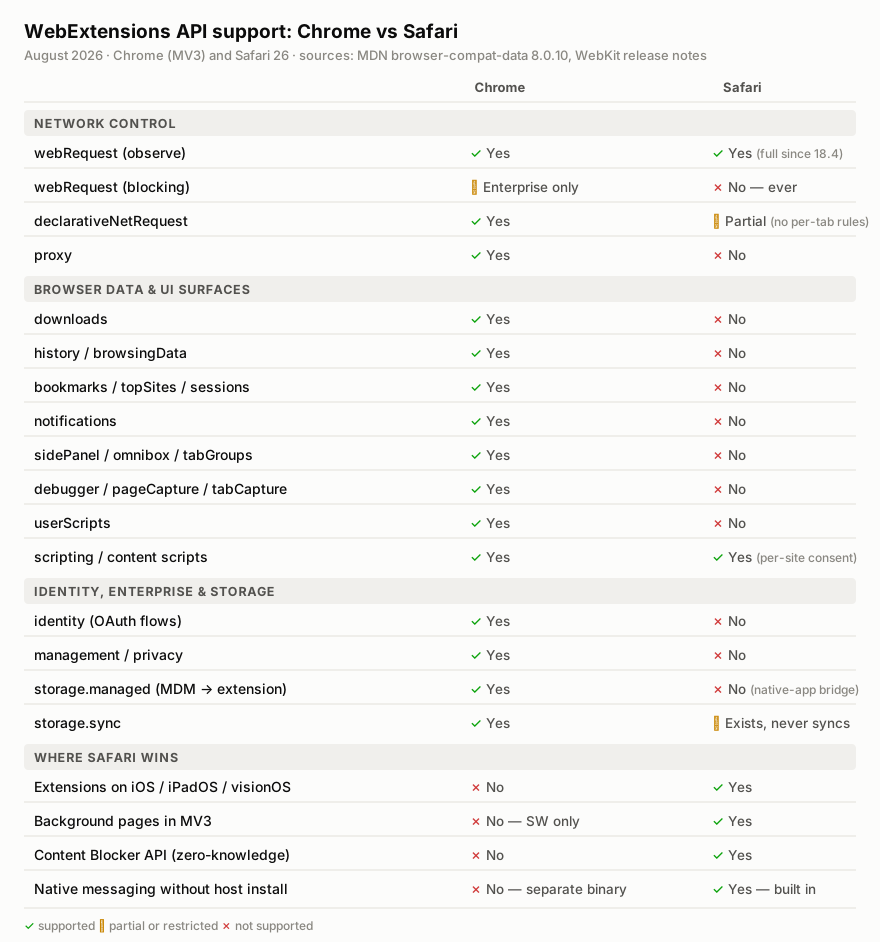
Safari supports a large, real subset of the WebExtensions API — content scripts,
scripting with MAIN-world injection, tabs, storage, alarms,
declarativeNetRequest, even the observational webRequest events. What it
does not have, and by all appearances never will:
- Blocking
webRequest. Safari fires the observe-only events, but there is noBlockingResponse— no extension can synchronously block, redirect, or modify a request. Chrome’s MV3 famously removed this too, but kept it for enterprise force-installed extensions. Safari has no such exception. There is no code path in Safari where any extension vetoes a request in-flight. downloads— no observing, cancelling, or initiating downloads.identity— nolaunchWebAuthFlow, so no first-class OAuth for extensions.history,browsingData,bookmarks,topSites,sessions— the browsing-record APIs, absent wholesale.notifications,sidePanel,omnibox,tabGroups,userScripts— surfaces and integration points, absent.management,privacy,proxy,debugger,pageCapture,tabCapture,desktopCapture— the introspection-and-control tier, absent.storage.managed— no direct channel from device management into the extension.storage.syncexists but doesn’t sync. There is no iCloud transport behind it; it’s an alias oflocal.
Why? Apple has actually said, on the record, more than people give it credit for. The 2015 WebKit content-blockers post is the founding document: JavaScript -callback request blocking “uses a lot of energy, reducing battery life, and increases page load time by adding latency for each resource” — and, on privacy, with declarative rules “the extension does not see the URLs of pages and resources the user browsed to… we do not track you by design.” Everything Safari refuses follows from those two sentences. The rest — the theory that the App Store packaging requirement and the $99/year developer program are a distribution tollbooth — is widely believed and plausibly true, but it’s commentary, not a stated rationale, and it’s worth keeping the two apart.
Here’s the part that reframed my thinking: every API Safari withholds is
simultaneously a lost defensive capability and an eliminated abuse channel. No
debugger means no Chrome-DevTools-Protocol superpowers for anti-phishing
tooling — and it also removes the API that Chrome infostealers have used to read
cookies and drive the browser invisibly. No downloads means we can’t cancel a
malicious file mid-download — and a rogue extension can’t touch your downloads
either. No history means no retro-hunting visited URLs against fresh threat
intel — and no history exfiltration. Safari didn’t forget to build the
security-vendor toolbox. It declined to build it, because the same toolbox is
the malware toolbox.
For a product like ours, the sharpest consequence is the first one. Without
blocking webRequest, you cannot hold a navigation while a cloud reputation
verdict comes back. Every available pattern on Safari is racy: push verdicts
into declarativeNetRequest dynamic rules ahead of time (and lose the race on
first visit to a brand-new threat), or observe the navigation and redirect the
tab to an interstitial (a window in which the malicious page has already started
executing). Safari’s DNR can’t even scope a rule to a single tab — the tabIds
condition doesn’t exist — so “isolate just this one risky tab” can’t be
expressed at the network layer at all. You architect around it: declarative
rules as the first line, fast server-side verdicts, page-level containment. But
you should know going in that fail-open, eventually-consistent blocking is the
ceiling.
3. Permissions: one bad decision vs. a thousand small ones
The permission models are the philosophical core of the comparison, and neither side wins cleanly.
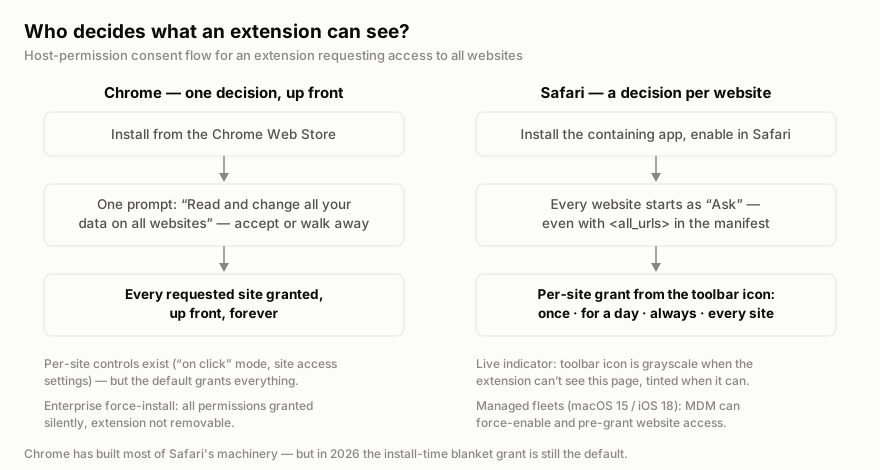
Chrome bundles everything into a single install prompt. “Read and change all your data on all websites” — accept or walk away. The research on this is old and damning: Felt et al. found back in 2011 that 91% of top Chrome extensions triggered at least one warning, which means the warnings carry almost no signal; a 2021 SOUPS study found users mostly don’t understand what extensions can do and substitute trust in the developer for comprehension. One decision, made blind, granting everything forever.
Safari refuses the blanket grant entirely. Even if your manifest requests
<all_urls>, every website starts as “Ask.” The extension’s toolbar icon
renders grayscale when it can’t see the current page and tinted when it can
— a live, per-page, always-visible answer to “is this extension watching right
now?” that I think is the best transparency affordance in any browser. When the
user grants access, they choose the scope: this site once, this site for a day,
this site always, or every site.
And yet. The consent moment is so subtle that it frequently never happens. The
canonical Safari extension bug report — ours included — is “user installs the
extension, never clicks the toolbar icon, concludes it’s broken.” There is no
event that tells your code Safari wants to show its permission UI; you poll
permissions.contains() and build your own onboarding that begs the user to
click the puzzle icon. We shipped a popup banner with a step-by-step mock of
Safari’s own Allow control, because that’s what it takes. Meanwhile “Always
Allow on Every Website” is a one-tap escape hatch that reconstructs Chrome’s
blanket grant anyway.
The quietly funny footnote: Chrome has already built Safari’s entire machinery —
per-site access controls, on-click-only mode, even a
permissions.addHostAccessRequest() chip — but in 2026 it still grants
everything up front by default. Chrome converged on Safari’s design and then
declined to turn it on.
4. The supply-chain inversion
Here is the strongest argument I know for Safari’s most-hated property.
Chrome extensions auto-update silently, fleet-wide, within about five hours of publication. As a developer I loved this. As a security person, look at the incident record it produced:
- Cyberhaven, December 2024. A phishing email to extension developers impersonating Chrome Web Store support led to OAuth publish rights over ~35 extensions with roughly 2.6 million users. Malicious versions shipped through the auto-update channel with zero user interaction. One of the compromised extensions belonged to a data-loss-prevention security vendor.
- RedDirection, July 2025. Eighteen Chrome and Edge extensions, ~2.3 million users, that shipped clean — some for years — and then turned malicious in a later silent update.
- FreeVPN.One, 2025. Over 100k installs and a Chrome Web Store “Verified” badge; an update turned it into spyware screenshotting every page.
- The Great Suspender, 2020. The prototype: a beloved 2M-user extension sold to an unknown buyer, weaponized by update.
- A 2024 Stanford/CISPA study put the systemic number at 280 million users who installed malware-carrying extensions over a two-and-a-half-year window, with malicious extensions surviving in the store for 380 days on average.
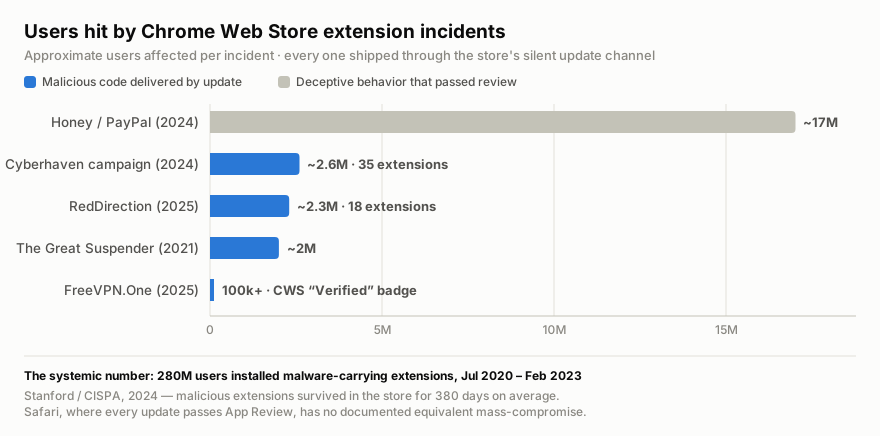
Notice what all of these have in common: none of them exploited an extension API. They exploited the store — the publisher account, the review gap, the silent update channel. Which is an awkward fact for the Manifest V3 story, since MV3’s security rationale was all about constraining APIs, and the MV2 purge cost Chrome its best content blocker while every incident above was MV3-era or MV3-compatible.
Now invert it. On Safari, every extension update is an App Store app update: developer-account signing, notarization’s automated malware scan, and human review, every time. The porting war stories — mine too — file this under “friction”: your emergency fix waits days in a review queue, which for a security product is genuinely painful and pushes you (correctly) to keep threat logic server-side. But the same gate means a Cyberhaven-style mass compromise requires beating Apple’s review on every push, and there is no documented equivalent mass-compromise of Safari web extensions. Review-gating is not a proof system — App Review’s inconsistency is legendary — but it raises attacker cost by orders of magnitude on exactly the channel attackers actually use.
Chrome’s greatest strength is its documented largest attack surface. Safari’s greatest annoyance is a supply-chain control. I don’t think either vendor would phrase it that way, which is exactly why it’s worth a blog post.
5. The wrapper app is a feature wearing a bug costume
Every account of porting to Safari — and I nodded along before I understood better — treats the mandatory native app wrapper as pure overhead. Your extension can’t just be an extension; it must ship inside a signed Mac or iOS app, built in Xcode, and the app has to do enough to survive App Review’s “minimum functionality” rule.
Then you notice what Chrome makes you do the moment your extension needs anything native. Chrome’s native messaging requires a separate host binary that the Web Store cannot distribute: your users run a second installer, which drops a JSON manifest into a hidden directory — or a Windows registry key — so Chrome can find and spawn your process over stdio. Two artifacts, two update channels, no store review of the native side, and an eternal support tail of “native host not found.”
Safari’s wrapper is that entire problem solved by inversion. The native app
isn’t a bolt-on to the extension; the extension rides inside the native app, one
signed and reviewed artifact, with native messaging built in —
browser.runtime.sendNativeMessage() reaches your handler with no registration
step at all. And the native side isn’t an empty shell unless you leave it as
one. It has the Keychain, so secrets never sit in storage.local where a
page-context compromise could reach them. It has biometrics, real compute,
system frameworks, StoreKit. 1Password’s Safari extension is the production
proof: a thin store app whose native half does the real cryptographic work.
We felt both edges. Losing storage.managed meant MDM-delivered enterprise
config had to hop from managed app preferences into the containing app and
across the native bridge into the extension — plumbing Chrome gives you for
free. Losing identity meant our SSO flow got rebuilt through the same bridge.
That was real work. But the destination is an architecture where the trusted
material lives on the native side of a process boundary, which is better than
where it lived in our Chrome extension. The wrapper made us do the right thing.
6. iOS is the moat
The simplest fact in this whole comparison is the one that justified the port: Chrome on iOS cannot run extensions. At all. Still. Including in the EU.
The DMA forced Apple to allow non-WebKit engines in Europe, and a Blink-based Chrome for iOS exists as an EU-only pilot — incomplete (printing, downloads, find-in-page are all still gappy per Igalia’s public tracking) and shipping without extension support. Kagi’s Orion browser has proven for years that iOS itself doesn’t forbid extensions; the economics and Apple’s rules around mainstream browsers do. In practice, in 2026, a Safari web extension is the only way to put URL scanning, phishing protection, or any extension-shaped defense into the default browser of an iPhone.
For a security company that is not a nice-to-have. The phone is where the phishing links get tapped — SMS, personal email, messaging apps all open in Safari. Desktop Chrome is where the security-extension market competes; mobile Safari is where a meaningful slice of the actual risk lives, and the competition can’t follow you there. Every hour we spent fighting Xcode was, viewed correctly, spent crossing a moat most of our competitors are still standing outside of.
(Honorable mention for the same reason: since iOS 18 and macOS 15, MDM can force-enable a Safari extension and pre-grant its website access on supervised devices. Until 2024, Safari’s per-site consent model made fleet deployment of a security extension essentially impossible; now it’s merely harder than Chrome’s. That change got almost no coverage and it’s the one that made corporate Safari a real target for us.)
7. What I’d tell you before you port
- Trust the converter’s warnings, not your test run. Safari’s signature failure mode is the silent no-op — APIs that exist, accept your calls, and do nothing. Budget for an audit of every API you touch, not a smoke test.
- Prefer a background page over a service worker on Safari — MV3 allows it there, iOS effectively demands the non-persistent variant, and Safari’s service workers have a documented history of dying and staying dead. Register listeners synchronously at the top level; keep all state in storage; assume your background context can be unplugged at any millisecond. (Chrome MV3 already taught you most of this. Safari grades the same exam harder.)
- Move threat logic server-side. Review-gated updates mean you can’t ship an emergency client fix in hours, so design for it: server-delivered policy, verdicts, and rules, with the client as a thin enforcement shell. This is good architecture on Chrome too — Safari just makes it mandatory.
- Build permission onboarding as a first-class feature. Poll
permissions.contains(), explain the grayscale icon, show users exactly where Safari’s Allow control is. On consumer Safari, an extension nobody granted is an extension that doesn’t exist. - Treat the wrapper as an asset from day one. Put secrets in the Keychain, put enterprise config through the native bridge, and give the container app a real job so App Review’s minimum-functionality rule never bites.
Safari’s extension platform is smaller, stricter, slower to ship to, and occasionally maddening. It is also, by design, the platform where a compromised extension can do the least damage, where updates can’t silently betray users, and where the iPhone lives. Chrome remains the better platform for building an extension. Safari might be the better platform for trusting one — and after this port, I’m not sure which of those I’d rather have my name on.